
SwitchRoo Update: Prototype 2, Release Variants & The Road to Launch
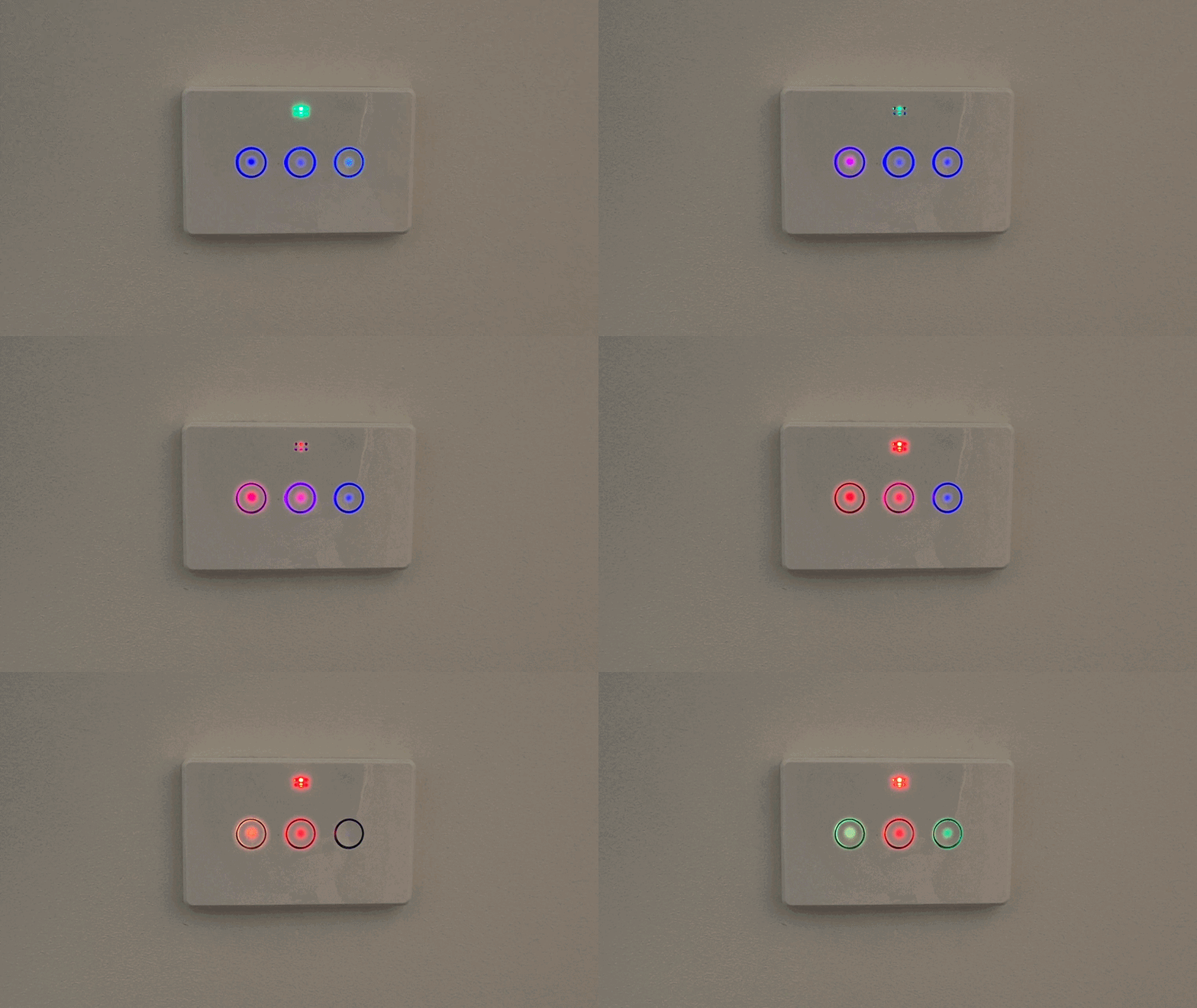
If the last post was “here’s what we’re building,” this one is “here’s what’s real now.”
A lot has moved since February. Prototype 2 is in hand, the variant lineup is locked, the reflow oven is running, and the RGB LEDs are working in-wall. That’s a live SwitchRoo board inside a Bunnings Deta housing in the photo above, lighting up each button independently. We’ve also got mmWave motion detection triggering the lights, which I’ll get to.
Here’s the full update.
Website Updated
Before getting into hardware, the MakerRoo website has been updated with a lot more product detail ahead of launch. The variants are now documented, and there’s a proper breakdown of how SwitchRoo compares to the Deta smart switches, including where it wins and where the tradeoffs are. If you haven’t looked at the site recently, it’s worth a read.
Non-Smart Deta Switches Work Too
Quick win worth calling out: the standard (non-smart) Deta touch switch housings from Bunnings are also compatible with the SwitchRoo PCB.
Previously the assumption was you’d be swapping out an existing Deta smart switch. But if you’re starting fresh or want to add smart switches to rooms that never had them, you can pick up the cheaper non-smart Deta housing and drop SwitchRoo straight in. They’re significantly less expensive than the smart variants.
One difference worth knowing: the non-smart faceplate doesn’t have the cutout for the status LED. The RGB LEDs on SwitchRoo are bright enough that they should shine through the plastic without issue, but if that doesn’t work for you we’ll be providing 3D-printable faceplates with the cutout holes in the right spots. Those printable plates will also be useful down the track for future variants like temperature and humidity sensor versions, which will need their own cutout layouts.
Same installation process either way. Same result.
Prototype 2
The second prototype is done and it’s close. Not “close-ish” — close. The form factor is right, the components are right, and the things that were rough on prototype 1 are resolved.
I took the opportunity to upgrade the RGB LED’s to RGBW, giving it a more professional look.
I’m not calling it the release version yet because there are still a few things I want to validate before committing to a production run. But if prototype 2 comes back clean, the release version will be a very small delta.\
More photos and specifics in an upcoming post once I’ve finished the validation run.
Release Variants
After going back and forth on this, the launch lineup is simple: SR-D3 only to start, with 1-gang and 2-gang following shortly after.
The 3-gang is the right place to start because it’s the most flexible. You’re not locked into using all three relays. If you’ve got two lights and three buttons, the third button is yours to assign to whatever you want. Scene trigger, fan control, a toggle for something completely unrelated. ESPHome handles the mapping, so the hardware doesn’t constrain you.
The 1 and 2 button/gang variants should be a fast follow as it is just excluding (DNP) the buttons and LEDs. The 4 button variant would require a board layout redesign, and not sure if the mmWave radar will fit as nicely in the 4 button variant, a challenge for another day.
The two variants at launch will be:
- SR-D3 — standard
- SR-D3-MW — with mmWave presence detection
The mmWave module is working. It’s detecting presence and triggering the LEDs and relays as expected. Whether you need it depends on your use case.
I have also started looking into the dimmer versions of the Deta smart switches to confirm we can release a version that does that in the future, and maybe even just a software update, will have to investigate.
Firmware: Pro or Plug-and-Play?
We have a working ESPHome config. It covers everything: buttons, relays, RGB(W) LEDs, OTA updates, Home Assistant discovery.
The question I’m sitting with is how much to do for the user out of the box.
The “pro” approach is shipping with a base config. Functional, but you’re expected to know ESPHome and customise from there. That’s how most of the community is used to working.
The alternative is a zero-config experience: SwitchRoo shows up on your network, gets adopted into Home Assistant, and the buttons work immediately. No YAML required. More approachable, but it changes the first-run experience for people who’d rather start from a blank config.
I’m leaning toward zero-config as the default with the base config available for those who want to start from scratch. But I’d genuinely like to know what you think. Come share your view in the Discord thread.
In any case I plan to have a few example / community configs hosted on our docs site, including a state machine example I have been running in my bathroom switch for awhile now on my original modded deta smart switch.
Assembly: Building It In-House?
The short version: in-house assembly, which means building the tooling to do it properly.
Reflow oven is done. It’s running and the temperature profile is dialled in. The auto-open door mechanism works. This was the main unlock for moving beyond hand soldering. I’ll make a mention of this in the Discord next week with photos etc.
I am now building a vacuum box for stencil work to get paste application clean and consistent. This is inspired by Unexpected Maker’s project.
Pick-and-place machine is the missing piece. Hand-placing components is fine for prototypes, it’s not viable for a production run. A PnP machine would be great but we are just too early (no revenue yet) so I think I will look into outsourcing initially.
Outsourcing is a good option for out stage, but doing it in-house gives better control over quality, turnaround, and cost at the volumes we’re considering so that is the ideal future.
Everything Else Coming Together
Packaging, e-commerce setup, and inventory management are all in progress. I’ll do a separate post on the stack once it’s settled. There are some interesting decisions in there around how stock availability, checkout, and order management connect without relying on an all-in-one platform.
The docs site is also in progress. Proper installation guides, wiring diagrams, and ESPHome config references.
What’s Next
Prototype 2 validation, then a production run decision.
If you haven’t already, join the email newsletter waitlist or come say hi in the Discord.
Cheers, Sam. Makerroo
Comments
Add a comment on Discord
New to our Discord? Join first, then look for the thread titled "SwitchRoo Update: Prototype 2, Release Variants & The Road to Launch" in #blog-discussions. Then your comments will appear here!